Graphic Clock
This applet plays with different possibilities for showing the time graphically. It was based orginally on a screensaver that was popular when I was at Sun.
In GraphicClock, the current second, minute and hour are each represented by a different colored square. There are different layouts and color effects to choose although not all representations are useful for telling the time. Right-click on the applet to change the representation.
Architecture
In my recent work, I didn't get much opportunities to use the Model-View-Controller pattern, so I used it in this applet.
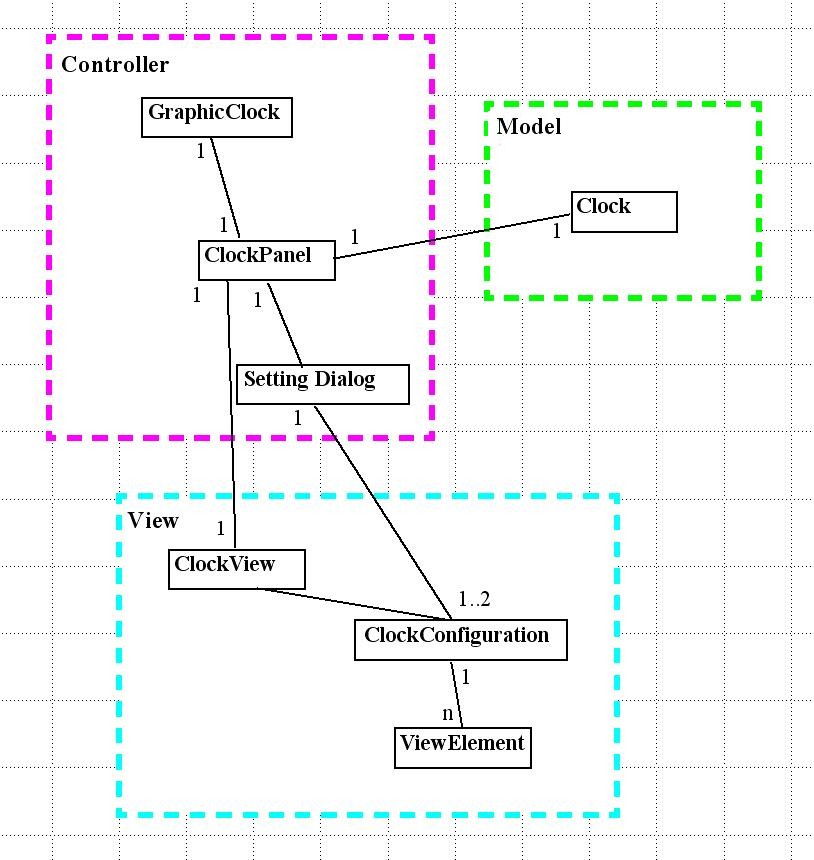
The Model contains a single class which determines the correct time.
The Controller is the Applet start code, a class (with a timer) that connects a View with a Model, and a dialog to adjust the view's settings. When the controller's timer goes off, it instructs the clock to get a new time and the view to get the clock's new state.
The View is the interesting part. The ClockView class is abstract, providing the interface to set a configuration and update the current time representation. The only concrete ClockView is SquarePane, which creates an array of Swing JPanels; Swing controls the layout of and generally manages the JPanels. The ClockConfiguration class aggregates the various sorts of customizations; SquarePane uses ClockConfiguration to figure how to color each JPanel in its array. The current customizations consist of layouts and color effects; these are both subclasses of ViewElement. Each customization is implemented in its own class.
ClockColor, a sibling of ClockGeometry, has been left out, and not all ClockGeometry subclasses have been included.

I used a factory to allow the Settings dialog to specify which layout or color effects to use without in-depth knowledge of what is available. This means that the only place I need to keep track of the customized classes is in ClockConfiguration; I plan to replace the hardcoded list with Java class reflection code to determine at runtime the list of custom behaviors.